HTML5 WEB APP程式設計第二周心得
📖32 分鐘閱讀
#課程心得
Math.random()、switch case、陣列操作、字串拼接,使用CSS & JavaScript 實作轉盤抽獎效果。
上課內容心得
Math.random
Math.random()這個函式可以隨機抽取一個數字介於0 ~ 1之間
如果想要抽出 0 ~ 10 的數字可以使用
Math.random() * 10參考連結:
W3Schools - JS Math.random
Switch Statement
  switch(rand) {
    case 0:
      document.getElementById("result").innerText = "便當";
      break;
    case 1:
      document.getElementById("result").innerText = "炒飯";
      break;
    case 2:
      document.getElementById("result").innerText = "牛肉麵";
      break;
    case 3:
      document.getElementById("result").innerText = "壽司";
      break;
}- 單次執行:Switch 僅會被執行一次。
- 數值比對:將計算出的數值,依序與每個 case 區塊的值進行比對。
- 程式執行:
若比對成功(有匹配):執行該 case 所對應的程式區塊。
若比對失敗(無匹配):則不執行任何程式碼(若未撰寫預設的 default 區塊)。
參考連結:
W3Schools - JS Switch Statement
Arrays
let foods = ["便當", "炒飯", "牛肉麵", "壽司", "漢堡"];| 名稱 | 說明 |
|---|---|
| Elements | 陣列是一組數值的清單,清單中的每個數值稱為「元素」 |
| Ordered | 陣列中的元素會根據其**索引值(Index)**進行有序排列 |
| Zero indexed | 第一個元素的索引值為 0,第二個為 1,以此類推 |
| Dynamic size | 陣列長度可動態變更,隨著元素的增減自動調整大 |
| Heterogeneous | 允許在同一個陣列中混合儲存不同型態的資料(如數字、字串、物件或其他陣列) |
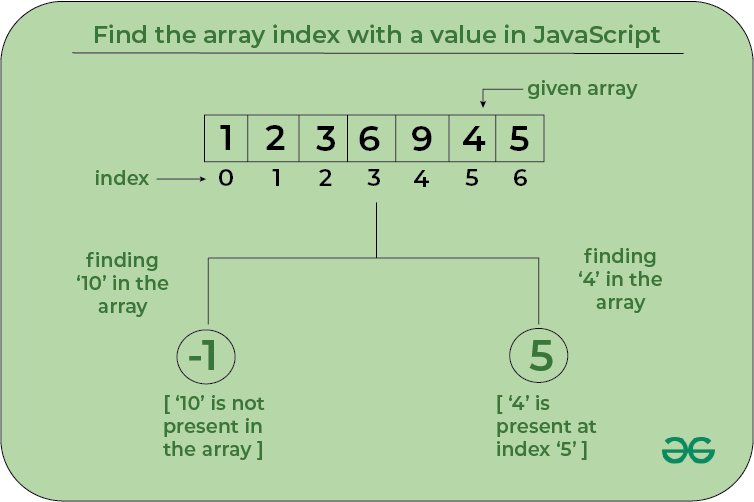
參考連結:
JavaScript Arrays - GeeksforGeeks
W3Schools - JS Arrays
字串相加
choice.name + "<br><img src='" + choice.img + "' width='150'>";字串是可以透過相加的方式組合的
CSS conic-gradient 畫圓盤
<style>
  body { font-family: sans-serif; text-align: center; padding-top: 40px; }
  h2 { margin-bottom: 20px; }
  .wheel-container {
    position: relative;
    width: 300px;
    height: 300px;
    margin: 0 auto 20px auto;
  }
  .wheel {
    width: 100%;
    height: 100%;
    border-radius: 50%;
    border: 5px solid #333;
    background: conic-gradient(
      #FF9A9E 0deg 90deg,
      #FAD0C4 90deg 180deg,
      #A1C4FD 180deg 270deg,
      #C2E9FB 270deg 360deg
    );
    transition: transform 4s cubic-bezier(0.25, 1, 0.5, 1);
  }
  /* 指針 */
  .pointer {
    position: absolute;
    top: -20px;
    left: 50%;
    transform: translateX(-50%);
    width: 0;
    height: 0;
    border-left: 15px solid transparent;
    border-right: 15px solid transparent;
    border-bottom: 30px solid #e74c3c;
  }
  button {
    padding: 10px 25px;
    font-size: 1.2em;
    cursor: pointer;
  }
</style>
參考連結:
W3Schools - CSS Conic Gradients
conic-gradient () CSS function - CSS | MDN - MDN Web Docs
稀土掘金 - html轉盤抽獎,conic-gradient+transform
完整轉盤抽籤實做
加上音效、機率、指針
<!DOCTYPE html>
<html lang="zh-Hant">
<head>
<meta charset="UTF-8">
<title>版本9 - 簡易圓盤轉動</title>
<style>
  body { font-family: sans-serif; text-align: center; padding-top: 40px; }
  h2 { margin-bottom: 20px; }
  .wheel-container { position: relative; width: 300px; height: 300px; margin: 0 auto 20px auto; }
  .wheel { width: 100%; height: 100%; display: block; border-radius: 50%; transition: transform 4s cubic-bezier(0.25, 1, 0.5, 1); }
  .pointer { position: absolute; z-index: 1; top: -20px; left: 50%; transform: translateX(-50%); width: 0; height: 0; border-left: 15px solid transparent; border-right: 15px solid transparent; border-top: 30px solid #e74c3c; }
  button { padding: 10px 25px; font-size: 1.2em; cursor: pointer; }
  #result { margin: 20px 0 0; font-size: 1.2em; }
</style>
</head>
<body>
<h2>幸運轉盤</h2>
<div class="wheel-container">
  <div class="pointer"></div>
  <canvas class="wheel" id="wheel" width="300" height="300"></canvas>
</div>
<button id="spinButton" onclick="spin()">轉動</button>
<p id="result">中獎結果:尚未抽獎</p>
<script>
// 目前轉盤的旋轉角度,累積角度可以讓每次都順時針旋轉
let currentRotation = 0;
// 抽獎進行中時,禁止重複按下按鈕
let isSpinning = false;
let audioContext;

// 獎項設定:probability 是中獎機率,所有 probability 加總必須是 100
// 想調整機率時,只需要修改這裡的數字即可
const prizes = [
  { name: "大獎", probability: 10, color: "#FF9A9E" },
  { name: "二獎", probability: 20, color: "#FAD0C4" },
  { name: "三獎", probability: 30, color: "#A1C4FD" },
  { name: "四獎", probability: 40, color: "#C2E9FB" }
];

const wheel = document.getElementById("wheel");
const context = wheel.getContext("2d");

// 依照每個獎項的機率比例,動態畫出不同大小的扇形
function drawWheel() {
  const center = wheel.width / 2;
  const radius = center - 5;
  let currentAngle = -Math.PI / 2;

  context.clearRect(0, 0, wheel.width, wheel.height);
  prizes.forEach((prize, index) => {
    const sliceAngle = (prize.probability / 100) * Math.PI * 2;
    const startAngle = currentAngle;
    const endAngle = startAngle + sliceAngle;
    currentAngle = endAngle;

    context.beginPath();
    context.moveTo(center, center);
    context.arc(center, center, radius, startAngle, endAngle);
    context.closePath();
    context.fillStyle = prize.color;
    context.fill();
    context.strokeStyle = "#333";
    context.lineWidth = 2;
    context.stroke();

    context.save();
    context.translate(center, center);
    context.rotate(startAngle + sliceAngle / 2);
    context.fillStyle = "#333";
    context.font = "16px sans-serif";
    context.textAlign = "right";
    context.fillText(prize.name, radius - 12, 5);
    context.restore();
  });
}

// 使用 Web Audio 播放簡單的提示音
function playSound(frequency, duration) {
  audioContext ||= new (window.AudioContext || window.webkitAudioContext)();
  const oscillator = audioContext.createOscillator();
  const gain = audioContext.createGain();
  oscillator.frequency.value = frequency;
  gain.gain.setValueAtTime(0.08, audioContext.currentTime);
  gain.gain.exponentialRampToValueAtTime(0.001, audioContext.currentTime + duration);
  oscillator.connect(gain).connect(audioContext.destination);
  oscillator.start();
  oscillator.stop(audioContext.currentTime + duration);
}

function spin() {
  if (isSpinning) return;

  // 依照 probability 加權抽獎,而不是每個獎項平均機率
  const randomNumber = Math.random() * 100;
  let accumulatedProbability = 0;
  let prizeIndex = 0;
  prizes.some((prize, index) => {
    accumulatedProbability += prize.probability;
    if (randomNumber < accumulatedProbability) {
      prizeIndex = index;
      return true;
    }
    return false;
  });

  // 計算中獎扇形的中心角,讓它最後停在指針位置
  const angleBeforePrize = prizes
    .slice(0, prizeIndex)
    .reduce((total, prize) => total + prize.probability, 0) * 3.6;
  const prizeAngle = angleBeforePrize + prizes[prizeIndex].probability * 1.8;
  const targetAngle = (360 - prizeAngle - (currentRotation % 360) + 360) % 360;
  const randomDeg = 720 + targetAngle;
  currentRotation += randomDeg;
  isSpinning = true;
  document.getElementById("spinButton").disabled = true;
  document.getElementById("result").textContent = "中獎結果:轉動中...";
  wheel.style.transform = `rotate(${currentRotation}deg)`;

  playSound(520, 0.15);
  setTimeout(() => {
    document.getElementById("result").textContent = `中獎結果:${prizes[prizeIndex].name}`;
    playSound(880, 0.3);
    document.getElementById("spinButton").disabled = false;
    isSpinning = false;
  }, 4000);
}

drawWheel();
</script>
</body>
</html>