C++ 類別(Class)基礎與應用
📖39 分鐘閱讀
#C++#進階
本文介紹 C++ 類別的概念,包括宣告、成員存取控制、物件、建構元、靜態成員、友誼函數及物件陣列的應用。
C++ 類別(Class)
概念
類別(class)是結構(struct)的延伸,可儲存不同資料型態的成員,並新增成員函數,支援物件導向程式設計。類別包含:
- 資料成員:儲存物件的屬性。
- 成員函數:定義物件的行為。
與結構的差異:
- 結構預設成員為公用(
public),類別預設為私有(private)。 - 結構用於簡單資料聚合,類別支援複雜行為與封裝。
宣告
語法:
class 類別名稱 {
public:
    資料型態 變數名稱;
    回傳值型態 函數名稱(型態1 引數1, 型態2 引數2) {
        return 運算式;
    }
private:
    // 私有資料成員或函數
};
範例:
#include <iostream>
#include <string>
using namespace std;

class Car {
public:
    string color;
    string brand;
    void show_color() {
        cout << color << endl;
    }
private:
    int price;
};
特色
1. 成員存取控制
public:成員可於類別內外存取。private:成員僅限類別內存取(預設)。- 比較:
公有成員 私有成員 類別內存取 ✓ ✓ 類別外存取 ✓ ✗
私有成員的重要性:
- 封裝與抽象:隱藏內部細節,提供簡潔接口。
- 資料隱藏與安全:防止外部直接修改。
- 程式重用與維護性:降低耦合,方便修改。
- 存取控制:精確管理存取權限。
範例:
#include <iostream>
using namespace std;

class CWin {
private:
    char id;
    int width, height;
public:
    int area() {
        return width * height;
    }
    void set_member(char c, int w, int h) {
        id = c;
        width = w;
        height = h;
    }
};

int main() {
    CWin win1;
    win1.set_member('A', 10, 10);
    cout << "Area: " << win1.area() << endl;
    return 0;
}
輸出:
Area: 100
2. 實例變數
每個物件的資料成員獨立,稱為實例變數。
3. 物件(Object)
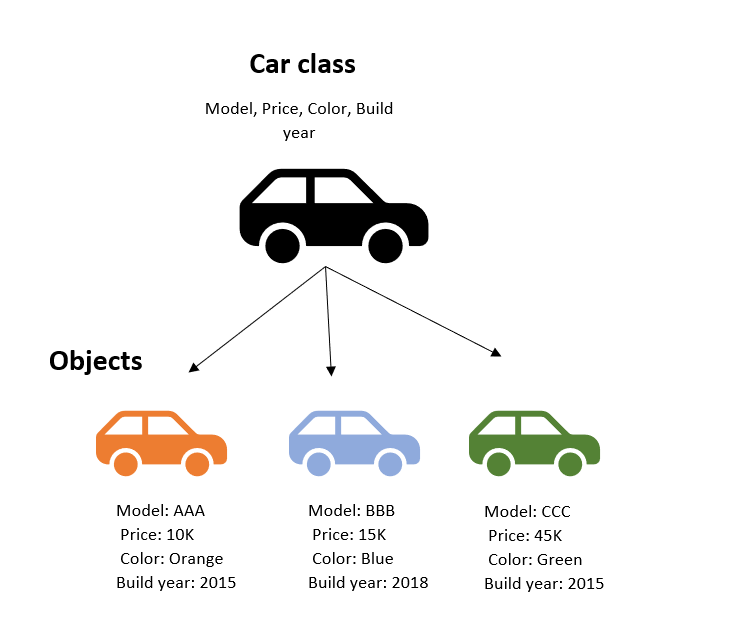
- 定義:物件是類別的實例,包含屬性與行為。
- 圖示:類別與物件關係(來源:https://nonlineardata.com/wp-content/uploads/2020/11/Car_Class.png)
宣告物件:
Car car1;
Car car1, car2;
範例:
#include <iostream>
#include <string>
using namespace std;

class Car {
public:
    string color;
    string brand;
};

int main() {
    Car car1;
    car1.color = "red";
    car1.brand = "Toyota";
    cout << car1.brand << ": " << car1.color << endl;
    return 0;
}
輸出:
Toyota: red
練習:
#include <iostream>
#include <string>
using namespace std;

class Car {
public:
    string color;
    string brand;
};

int main() {
    Car toyota, honda, ford;
    toyota.color = "green";
    toyota.brand = "Toyota";
    honda.color = "blue";
    honda.brand = "Honda";
    ford.color = "black";
    ford.brand = "Ford";
    cout << toyota.brand << ": " << toyota.color << endl;
    cout << honda.brand << ": " << honda.color << endl;
    cout << ford.brand << ": " << ford.color << endl;
    return 0;
}
輸出:
Toyota: green
Honda: blue
Ford: black
注意:
- 不同類別的物件可同名,區分方式是存入容器(如
vector<Car>)。 - 類別名稱首字母通常大寫。
類別成員
1. 資料成員
- 直接存取:類別內可直接使用資料成員名稱。
- 使用
this:指向當前物件,區分成員與參數。
範例:
#include <iostream>
#include <string>
using namespace std;

class Car {
public:
    string color;
    string brand;
    void show_color() {
        cout << this->color << endl;
    }
    void set_data(string color) {
        this->color = color;
    }
};

int main() {
    Car car1;
    car1.set_data("red");
    car1.show_color();
    return 0;
}
輸出:
red
2. 成員函數
- 類別內定義:
#include <iostream>
#include <string>
using namespace std;

class Car {
public:
    string color;
    string brand;
    void show_color() {
        cout << color << endl;
    }
};

int main() {
    Car car1;
    car1.color = "blue";
    car1.show_color();
    return 0;
}
輸出:
blue
- 類別外定義:
#include <iostream>
#include <string>
using namespace std;

class Car {
public:
    string color;
    string brand;
    void show_color();
};

void Car::show_color() {
    cout << color << endl;
}

int main() {
    Car car1;
    car1.color = "blue";
    car1.show_color();
    return 0;
}
輸出:
blue
練習:
#include <iostream>
#include <string>
using namespace std;

class Rabbit {
public:
    string name;
    int age;
    int weight;
    void show_info() {
        cout << "Rabbit " << this->name << " is " << this->age << " years old" << endl;
    }
};

int main() {
    Rabbit r1;
    r1.name = "bunny";
    r1.age = 1;
    r1.weight = 0.5;
    r1.show_info();
    return 0;
}
輸出:
Rabbit bunny is 1 years old
函數多載:
#include <iostream>
using namespace std;

class MathUtils {
public:
    int add(int a, int b) {
        return a + b;
    }
    double add(double a, double b) {
        return a + b;
    }
};

int main() {
    MathUtils m;
    cout << m.add(1, 2) << endl;
    cout << m.add(3.14, 0.22) << endl;
    return 0;
}
輸出:
3
3.36
練習:設置物件:
#include <iostream>
#include <string>
using namespace std;

class Rabbit {
public:
    string name;
    int age;
    int weight;
    void show_info() {
        cout << "Rabbit " << name << " is " << age << " years old" << endl;
    }
    void set_data(string name, int age, int weight) {
        this->name = name;
        this->age = age;
        this->weight = weight;
    }
};

int main() {
    Rabbit r1;
    r1.set_data("bunny", 1, 0.5);
    r1.show_info();
    return 0;
}
輸出:
Rabbit bunny is 1 years old
練習:傳遞物件:
#include <iostream>
#include <string>
using namespace std;

class Rabbit {
public:
    string name;
    int age;
    int weight;
    void set_data(string name, int age, int weight) {
        this->name = name;
        this->age = age;
        this->weight = weight;
    }
};

void show_info(Rabbit r) {
    cout << "Rabbit " << r.name << " is " << r.age << " years old" << endl;
}

int main() {
    Rabbit r1;
    r1.set_data("bunny", 1, 0.5);
    show_info(r1);
    return 0;
}
輸出:
Rabbit bunny is 1 years old
友誼函數
- 定義:非類別成員,可存取私有成員。
- 宣告:
- 類別內以
friend宣告原型,類別外定義。 - 類別內直接定義(可能為
inline)。
- 類別內以
範例:
#include <iostream>
using namespace std;

class CWin {
private:
    char id;
    int width, height;
public:
    void set_member(char c, int w, int h) {
        id = c;
        width = w;
        height = h;
    }
    friend void show_member(CWin w);
};

void show_member(CWin w) {
    cout << "window " << w.id << ": width = " << w.width << ", height = " << w.height << endl;
}

int main() {
    CWin win1;
    win1.set_member('A', 10, 10);
    show_member(win1);
    return 0;
}
輸出:
window A: width = 10, height = 10
靜態成員
1. 靜態資料成員
- 特色:所有物件共享,屬於類別。
- 初始化:類別外使用
類別名稱::靜態成員名稱。
範例:
#include <iostream>
using namespace std;

class CWin {
private:
    char id;
    int width, height;
public:
    static int num;
    CWin(char i, int w, int h) : id(i), width(w), height(h) {
        num++;
    }
    CWin() {
        num++;
    }
};

int CWin::num = 0;

int main() {
    CWin win1('A', 50, 50);
    CWin win2('B', 40, 50);
    CWin win3('C', 50, 40);
    CWin my_win[4];
    cout << "Number of objects: " << CWin::num << endl;
    return 0;
}
輸出:
Number of objects: 7
練習:靜態成員函數:
#include <iostream>
using namespace std;

class CWin {
private:
    char id;
    int width, height;
    static int num;
public:
    CWin(char i, int w, int h) : id(i), width(w), height(h) {
        num++;
    }
    CWin() {
        num++;
    }
    static void count() {
        cout << "已經建構的物件數量:" << num << endl;
    }
};

int CWin::num = 0;

int main() {
    CWin win1('A', 50, 50);
    CWin::count();
    CWin win2('B', 40, 50);
    CWin win3('C', 50, 40);
    CWin my_win[4];
    CWin::count();
    return 0;
}
輸出:
已經建構的物件數量:1
已經建構的物件數量:7
建構元
1. 宣告
- 類別內:
class Car {
    Car(string s1, string s2) {
        // 實作
    }
};
- 類別外:
class Car {
    Car(string s1, string s2);
};
Car::Car(string s1, string s2) {
    // 實作
}
範例:
#include <iostream>
#include <string>
using namespace std;

class Car {
private:
    string color;
    string brand;
public:
    Car(string s1, string s2) : color(s1), brand(s2) {}
    void show_color() {
        cout << color << endl;
    }
};

int main() {
    Car mazda("black", "Mazda");
    mazda.show_color();
    return 0;
}
輸出:
black
2. 特色
- 初始化物件。
- 物件創建時自動執行。
3. 建構元多載
#include <iostream>
#include <string>
using namespace std;

class Car {
private:
    string color;
    string brand;
    int price;
public:
    Car(string s1, string s2) : color(s1), brand(s2), price(50000) {}
    Car(string s1, string s2, int n) : color(s1), brand(s2), price(n) {}
    void show_color() {
        cout << color << endl;
    }
};

int main() {
    Car mazda("black", "Mazda");
    Car toyota("white", "Toyota", 1000000);
    mazda.show_color();
    toyota.show_color();
    return 0;
}
輸出:
black
white
4. 預設建構元
#include <iostream>
#include <string>
using namespace std;

class Car {
private:
    string color;
    string brand;
    int price;
public:
    Car(string s1, string s2) : color(s1), brand(s2), price(50000) {}
    Car(string s1, string s2, int n) : color(s1), branch(s2), price(n) {}
    Car() : color("white"), brand("none"), price(90000) {}
    void show_color() {
        cout << color << endl;
    }
};

int main() {
    Car mazda("black", "Mazda");
    Car toyota("white", "Toyota", 1000000);
    Car car3;
    car3.show_color();
    return 0;
}
輸出:
white
5. 建構元預設值
練習:
#include <iostream>
#include <string>
using namespace std;

class Car {
private:
    string color;
    string brand;
    int price;
public:
    Car(string c = "white", string b = "Toyota", int p = 300000) : color(c), brand(b), price(p) {}
    void show_color() {
        cout << color << endl;
    }
};

int main() {
    Car car1;
    Car car2("red");
    Car car3("blue", "Honda");
    car1.show_color();
    car2.show_color();
    car3.show_color();
    return 0;
}
輸出:
white
red
blue
6. 初始化串列
class CWin {
private:
    char id;
    int width, height;
public:
    CWin(char i = 'D', int w = 100, int h = 100) : id(i), width(w), height(h) {}
};
其他
1. 傳遞物件到函數
#include <iostream>
#include <string>
using namespace std;

class Rabbit {
public:
    string name;
    int age;
};

void show_info(Rabbit r) {
    cout << "Rabbit " << r.name << " is " << r.age << " years old" << endl;
}

int main() {
    Rabbit r1;
    r1.name = "bunny";
    r1.age = 1;
    show_info(r1);
    return 0;
}
輸出:
Rabbit bunny is 1 years old
2. 物件陣列
練習:
#include <iostream>
using namespace std;

class CWin {
public:
    char id;
    int width, height;
    CWin(char i = 'D', int w = 100, int h = 100) : id(i), width(w), height(h) {}
    void show_area() {
        cout << width * height << endl;
    }
};

int main() {
    CWin win_arr[3];
    CWin win1('A', 50, 50);
    win1.show_area();
    win_arr[0].show_area();
    win_arr[0] = win1;
    win_arr[0].show_area();
    return 0;
}
輸出:
2500
10000
2500
練習:傳遞物件陣列:
#include <iostream>
using namespace std;

class CWin {
public:
    char id;
    int width, height;
    CWin(char i = 'D', int w = 100, int h = 100) : id(i), width(w), height(h) {}
};

void print_area(CWin win_arr[], int n) {
    for (int i = 0; i < n; i++) {
        cout << "window " << win_arr[i].id << ": " << win_arr[i].width * win_arr[i].height << endl;
    }
}

int main() {
    CWin win_arr[3];
    CWin win1('A', 50, 50);
    print_area(win_arr, 3);
    return 0;
}
輸出:
window D: 10000
window D: 10000
window D: 10000