C++ 堆疊與佇列
📖20 分鐘閱讀
#C++#初學
本文介紹 C++ 堆疊與佇列的基本概念,包括其特色、宣告、使用方法(push、pop、front、back 等)以及遍歷方式。
C++ 堆疊與佇列
堆疊(Stack)和佇列(Queue)是兩種重要的資料結構,常用於管理有序資料。它們的主要區別在於資料的存取順序。
| 堆疊(Stack) | 佇列(Queue) | |
|---|---|---|
| 概念 | 後進先出(Last In, First Out, LIFO),最後加入的元素最先被移除。 | 先進先出(First In, First Out, FIFO),最先加入的元素最先被移除。 |
| 應用 | 撤銷與回復操作、函數呼叫棧、遞迴處理。 | 列印佇列、排隊系統、任務調度。 |
堆疊(Stack)
1. 特色
- 有序串列:由相同型態的元素組成。
- 後進先出(LIFO):最後加入的元素最先被移除。
- 單端操作:所有操作(放入與取出)發生在頂端(Top)。
- 動態增長:C++ 的
<stack>支援動態調整大小,無需指定固定容量。
圖示:堆疊 LIFO 示意圖(來源:https://media.geeksforgeeks.org/wp-content/cdn-Uploads/20221219100314/stack.drawio2.png)

2. 宣告
需包含 <stack> 標頭檔。
語法:
#include <stack>
std::stack<元素類型> 堆疊名稱;
範例:
#include <stack>
std::stack<int> myStack;
3. 使用
3.1 取得頂端元素
堆疊名稱.top();
範例:
#include <iostream>
#include <stack>
using namespace std;

int main() {
    stack<int> myStack;
    myStack.push(10);
    cout << "Top: " << myStack.top() << endl; // 輸出 10
    return 0;
}
3.2 放入(Push)
將元素加入堆疊頂端。
語法:
堆疊名稱.push(元素);
練習:
#include <iostream>
#include <stack>
using namespace std;

int main() {
    stack<int> myStack;
    myStack.push(10);
    myStack.push(20);
    myStack.push(30);
    cout << "Top: " << myStack.top() << endl; // 輸出 30
    return 0;
}
3.3 取出(Pop)
移除頂端元素,無返回值。
語法:
堆疊名稱.pop();
範例:
#include <iostream>
#include <stack>
using namespace std;

int main() {
    stack<int> myStack;
    myStack.push(10);
    myStack.push(20);
    myStack.push(30);
    cout << "Before pop: " << myStack.top() << endl; // 30
    myStack.pop();
    cout << "After pop: " << myStack.top() << endl; // 20
    return 0;
}
3.4 判斷是否為空
堆疊名稱.empty();
- 返回
true表示堆疊為空,false表示非空。
3.5 判斷是否為滿
- C++ 的
<stack>為動態結構,無固定容量限制,因此無isFull()函數。 - 修正:原文件中
isFull()不適用於標準<stack>,可忽略或用於自定義固定大小堆疊。
範例:檢查空狀態:
#include <iostream>
#include <stack>
using namespace std;

int main() {
    stack<int> myStack;
    cout << "Is empty? " << (myStack.empty() ? "Yes" : "No") << endl; // Yes
    myStack.push(10);
    cout << "Is empty? " << (myStack.empty() ? "Yes" : "No") << endl; // No
    return 0;
}
3.6 遍歷
- 堆疊無迭代器,需通過
top()和pop()遍歷。 - 注意:遍歷會移除元素,需謹慎操作。
範例:遍歷堆疊:
#include <iostream>
#include <stack>
using namespace std;

int main() {
    stack<int> myStack;
    myStack.push(10);
    myStack.push(20);
    myStack.push(30);
    while (!myStack.empty()) {
        cout << myStack.top() << " ";
        myStack.pop();
    } // 輸出 30 20 10
    cout << endl;
    return 0;
}
佇列(Queue)
1. 特色
- 先進先出(FIFO):最先加入的元素最先移除。
- 雙端操作:加入(enqueue)在尾端,移除(dequeue)在頭端。
- 動態增長:C++ 的
<queue>支援動態調整大小。
圖示:佇列 FIFO 示意圖(來源:https://media.geeksforgeeks.org/wp-content/cdn-Uploads/20221213113312/Queue-Data-Structures.png)

操作示意:佇列的 push 和 pop(來源:https://www.codingeek.com/wp-content/uploads/2016/09/push-popQ.png)
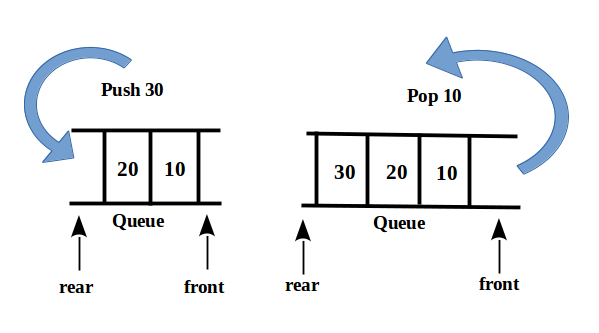
2. 宣告
需包含 <queue> 標頭檔。
語法:
#include <queue>
std::queue<元素類型> 佇列名稱;
範例:
#include <queue>
std::queue<int> myQueue;
3. 使用
3.1 取得第一個元素
佇列名稱.front();
範例:
#include <iostream>
#include <queue>
using namespace std;

int main() {
    queue<int> myQueue;
    myQueue.push(10);
    cout << "Front: " << myQueue.front() << endl; // 輸出 10
    return 0;
}
3.2 取得最後一個元素
佇列名稱.back();
範例:
#include <iostream>
#include <queue>
using namespace std;

int main() {
    queue<int> myQueue;
    myQueue.push(10);
    myQueue.push(20);
    cout << "Back: " << myQueue.back() << endl; // 輸出 20
    return 0;
}
3.3 放入(Enqueue)
將元素加入佇列尾端。
語法:
佇列名稱.push(元素);
練習:
#include <iostream>
#include <queue>
using namespace std;

int main() {
    queue<int> myQueue;
    myQueue.push(10);
    myQueue.push(20);
    myQueue.push(30);
    cout << "Front: " << myQueue.front() << endl; // 10
    cout << "Back: " << myQueue.back() << endl; // 30
    return 0;
}
3.4 取出(Dequeue)
移除頭端元素,無返回值。
語法:
佇列名稱.pop();
範例:
#include <iostream>
#include <queue>
using namespace std;

int main() {
    queue<int> myQueue;
    myQueue.push(10);
    myQueue.push(20);
    myQueue.push(30);
    cout << "Before pop - Front: " << myQueue.front() << ", Back: " << myQueue.back() << endl; // 10, 30
    myQueue.pop();
    cout << "After pop - Front: " << myQueue.front() << ", Back: " << myQueue.back() << endl; // 20, 30
    return 0;
}
3.5 判斷是否為空
佇列名稱.empty();
- 返回
true表示佇列為空,false表示非空。
範例:
#include <iostream>
#include <queue>
using namespace std;

int main() {
    queue<int> myQueue;
    cout << "Is empty? " << (myQueue.empty() ? "Yes" : "No") << endl; // Yes
    myQueue.push(10);
    cout << "Is empty? " << (myQueue.empty() ? "Yes" : "No") << endl; // No
    return 0;
}
3.6 遍歷
- 佇列無迭代器,需通過
front()和pop()遍歷。 - 注意:遍歷會移除元素,需謹慎操作。
範例:遍歷佇列:
#include <iostream>
#include <queue>
using namespace std;

int main() {
    queue<int> myQueue;
    myQueue.push(10);
    myQueue.push(20);
    myQueue.push(30);
    while (!myQueue.empty()) {
        cout << myQueue.front() << " ";
        myQueue.pop();
    } // 輸出 10 20 30
    cout << endl;
    return 0;
}